If your CRM can’t recognize the same account twice, it can’t be trusted once. Two records for one company means the won deal sits on one while the marketing touches sit on the other, two owners work the same account without knowing it, and scoring reads half a history and prices the account wrong.
Every guide to CRM hygiene says the same thing: it is not a one-time project. Then it lays out a project: audit, standardize, deduplicate, put the next cleanup on the calendar. The advice contradicts itself because something is missing from it, and the missing piece is not effort.
CRM hygiene is the state in which every real company and person exists as exactly one record, with standardized fields and reliable associations, maintained by rules that run on every record event rather than by periodic cleanups.
We learned this by turning the deduplication part of hygiene into code. The code would not run until the rules were written down: what makes two records the same entity, which class of match merges on its own, which record survives, and what waits for a human. This guide is the reasoning behind those rules, organized as the questions you will answer whether you install our code or write your own.
Why does the cleanup keep coming back? #
Because the rules were never written down. A cleanup fixes records; it does not fix the absence of the keys, definitions and enforcement that let them rot in the first place. A quarterly cleanup means your CRM is only clean four days a year. The duplicates never stopped arriving: every form fill, list import and integration sync creates them, and the day after the cleanup they start accumulating again.
A CRM that stays clean is a system with four connected parts:
- Matching keys and standardized fields. The identifiers that make two records comparable at all, stored in one agreed format.
- Deduplication. The rules that decide when two records are the same entity, which one survives, and what needs a human.
- One identity across systems. The same keys resolving the same customer everywhere, not just inside the CRM.
- Enforcement. The triggers and guardrails that apply all of the above to every record event, so a regression is caught in days.
The third part deserves a paragraph before this guide narrows to deduplication. Your CRM is not the only system holding a version of the customer: product analytics, marketing automation and billing each hold their own. They describe one customer only if every system resolves identity with the same keys. Two architectures do this well: resolve identity in the warehouse and feed the other systems from there, or resolve it in the CRM platform and let the others subscribe. What fails is having no owner at all, with each tool matching records its own way.
The rest of this guide is about the deduplication part, because that is the part we turned into code, and the part where unwritten rules cost the most.
Which keys make two records the same entity, and what gets normalized first? #
Hard identifiers, never the name. For companies: the domain, the LinkedIn company ID, and where the market has one, a registration or tax number. Two different companies can share a name, and one company will appear under three spellings, so a name can support a match but never make one. For people: the LinkedIn person ID, the canonical profile URL, and an exact professional email that is not a shared mailbox. The same name with a different company, a different email or a different LinkedIn profile is never a duplicate.
Keys only work after normalization. A LinkedIn company URL arrives in four forms, with and without www, with and without a trailing slash, and an exact-match search treats each one as a different company. Emails compare only lowercased. Phone numbers compare only with the country code resolved, because a French mobile stored with its leading zero and the same number stored with +33 will never match as strings. Normalization is the least glamorous work in the whole system, and skipping it is why a CRM that was “already deduplicated” still carries duplicate pairs: they were there all along, invisible to unnormalized comparison.
And a record with no keys cannot be matched at all. An account with no domain and no LinkedIn URL is invisible to every rule above, which is why enrichment comes before deduplication: first fill the identifiers, then match on them. Running deduplication on unenriched records does not find fewer duplicates, it finds them later, after they have split your history.
Which class merges on its own, and which waits for a human? #
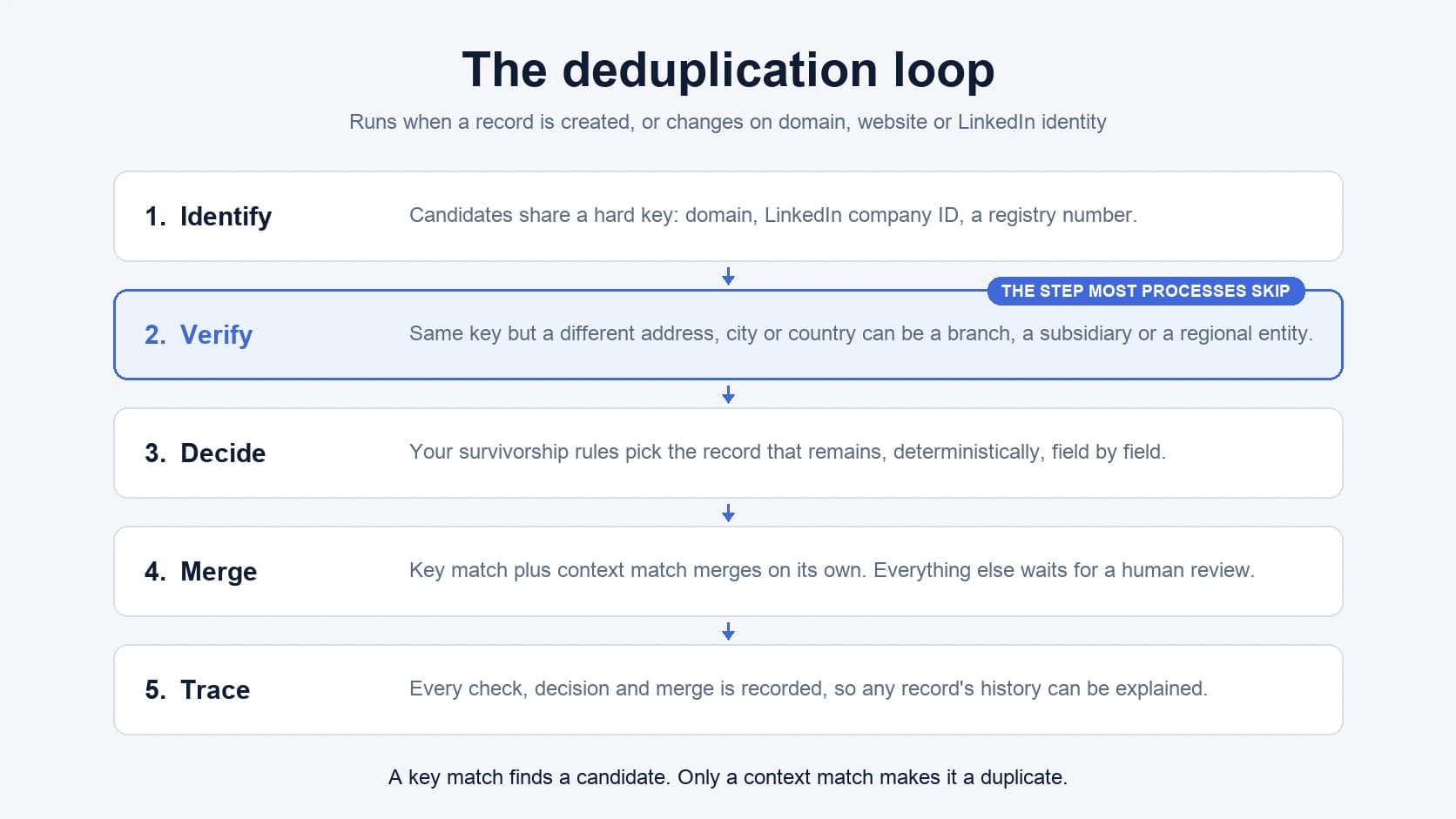
The dangerous step is not finding candidates, it is deciding what a candidate means. Identification and verification are different jobs. A shared key produces a candidate: two records, same domain. Verification decides whether they are the same entity, and context is what decides: the same key with a different address, city or country can be a branch, a subsidiary or a regional entity that deserves its own record.
So the automatic class is deliberately narrow: key match plus context match, with no conflicting identifiers between the records. That class merges on its own. Everything else goes to a person. Uncertain cases produce a review, not a merge: a human confirms before anything changes. For contacts, three shapes never merge automatically, whatever a score says: records matching on a phone number alone, records sharing a generic mailbox, and matching emails with conflicting LinkedIn identities.
The human queue is not a failure of automation, it is the design. The rules absorb most of the volume, which leaves a review queue small enough to actually be worked. And the asymmetry justifies the caution: false merges are worse than missed duplicates. A missed duplicate is a confusing account page. A false merge welds two companies’ deals, contacts and activity into one record, and no report downstream can un-weld them.
Which record survives, and what are your own tie-breakers? #
Deduplication is specific to each business’s needs and existing setup. Which record survives a merge, what merges without review, what happens to the record ID: these are decisions your business makes, not defaults a tool should apply silently. What follows is the starting order we found holds almost everywhere, and the places where yours will differ.
For accounts: the record with the most deals attached wins, then the most contacts, then the most fields filled. After that come the tie-breakers only you can name, because they live in your own systems. Keep whichever record is a customer. Keep the record that carries the billing customer ID. Keep the one holding the D-U-N-S number, or whatever identifier your system of record keys on.
For contacts: most deals, then a professional email over a personal one, then most fields filled, then most activity, then the oldest record.
Written as an ordered list, survivorship becomes something you can encode, and that is the point: the same two records must produce the same winner every time, or nobody will trust the merge. A language model has a place here, and it is not choosing. It can attach evidence to a review card, that two websites redirect to the same place, or that two registry numbers belong to one filing. The survivor is picked by the ordered rules, every time.
Duplicate or subsidiary? #
Some records look like duplicates and are actually structure. A European cybersecurity vendor selling through partners taught us the sharpest version of this: the same company can hold two or three commercial relationships at once, as an end user of the product, as a reseller, and as a distributor. And the same brand’s France entity can be a partner while its Belgium entity is a reseller. Same name, same group, same key by most rules, and a merge would collapse two different commercial relationships into one record.
The rule that falls out: cross-country merges are unsafe by default. When the same key resolves to entities in two countries, link them as parent and child instead of merging them. The link preserves what the merge would destroy: separate ownership, separate deal types, separate local context, connected under one group.
Hierarchy also changes the numbers. A parent scored as one of its children is under-tiered: scoring reads one subsidiary’s headcount and prices the whole group as a mid-market account. And it is mis-owned: two reps working two subsidiaries of one group, neither knowing about the other, is the duplicate-owner problem wearing a suit. The tree should be scored and owned as a tree.
What do you delete, and what do you keep? #
Deletion is a class of record, not a mood after an audit. Ghost accounts, the ones with no contacts and no deals attached, get deleted: they hold no history and no relationships, so nothing is lost.
Dormant is not ghost. A dormant record, one with no recent activity or enrichment, is kept and refreshed on a cadence. It carries history someone paid to build, it costs nothing to keep, and deleting it saves nothing except the appearance of a smaller problem.
A contact whose LinkedIn company no longer matches the company in your CRM is not dirty data either. It is a job change, which is to say it is pipeline. A person who moved companies gets updated and re-matched to the new company, never merged away and never deleted. The old relationship is preserved rather than overwritten: the previous company stays on the record as history, which is what lets the move read as a signal to act on instead of a field that was wrong.
Generic mailboxes, the info@ and contact@ addresses, are dissociated from person records rather than deleted. A shared mailbox is a company’s front door, not a person’s identity, so it has no business being a contact’s primary email. Keep the address where it is useful, remove it as an identity, and expect any list of generic patterns to be incomplete forever: admin@ and hello@ are obvious, the long tail takes judgment.
What does a merge do to the record ID, and how do you verify it? #
A native CRM merge can mint a brand-new record ID for the record that survives. HubSpot’s does, and it surprises almost everyone the first time. It also breaks things quietly: anything downstream keyed on the old ID, a billing integration, a sequencer enrollment, a warehouse join, a stored reference in another tool, now points at a record that no longer exists.
Two practices follow. First, verify by identity, never by stored IDs. After a merge, the check that matters is that the entity’s keys resolve to exactly one record: search the domain, the LinkedIn ID, the email, and one record should come back. Checking whether a remembered ID still exists tells you nothing, because the correct outcome of a native merge is that it does not. Second, inventory what is keyed on CRM IDs before your first merge, not after, so the breakage is a migration you planned rather than a mystery you debug.
A merge should not be a mystery in either direction. Before it runs, you should be able to see the plan: which record wins, and what happens to each field. After it runs, the trace should show what actually happened, which is what makes the verification above a lookup instead of an investigation.
Some setups genuinely cannot tolerate a changing ID, usually because too many downstream systems key on it. For them there is a variant: update the surviving record in place, move the associations over, then delete the other records, which keeps the original ID alive. It has more moving parts and more failure modes than the native merge, so treat it as a deliberate adaptation for a specific constraint, never the default.
How does it stay clean? #
With one set of definitions and two enforcement mechanisms. First the definitions: one definition of what an enriched record is and one of what a qualified record is, written once and called by every workflow that needs them. Five workflows each carrying their own version of “qualified” is how a CRM ends up holding five opinions and no answer.
The first mechanism is programmatic: triggers, not calendars. A new record triggers enrichment. A stale record triggers a refresh. Deduplication watches the fields that create duplicates, a record created or a change on domain, website or LinkedIn identity, and acts when they change, with a daily pass as the backstop for whatever the events miss. A scheduled mass cleanup is the mechanism you need when nothing is watching; when something is, the batch has nothing left to find.
The second mechanism is self-serve with guardrails, because people will always need doors into the CRM: a Slack command, a button on the record, a CSV upload. The requirement is that every door runs the same definitions, so the CSV upload enriches, deduplicates and upserts instead of appending blind, and the Slack command is an agent operating under the same rules as the scheduled workflows rather than a side channel around them.
The standard this buys you is simple to state: bad data should not survive a week. Not because a weekly cleanup catches it, but because every path into the CRM enforces the rules on the way in, and the loop catches what slips past.
The rules, as code #
Everything above is written down for a reason: it had to be, before it could run. The deduplication system this guide reasons through is codified as a cookbook: the audit that measures your duplicate classes before anything merges, the merge classes, the survivorship defaults, the review wiring, the verification. It ships as the CRM deduplication cookbook.
Because deduplication is business-specific, the cookbook does not apply itself silently. A skill on top asks the questions this guide just walked through, your tie-breakers, your protected identifiers, your review policy, your ID constraints, and adapts the code to your setup. The guide gives you the reasoning so those are decisions, not form fields.
If you want to see what the rules would look like on your CRM before any of it runs, book a mapping call: half an hour with a GTM engineer, and you leave with a plan specific to your own stack.
FAQ #
Safe CRM automation is a write policy, not caution: deduplication guards identity and protected fields guard values. Before any workflow writes, new and changed records are checked against hard keys, domain, LinkedIn ID and normalized email, so they cannot fragment history. On the value side, a run fills empty fields, overwrites only fields it is explicitly allowed to touch, and holds sensitive changes for approval. In Cargo these rules are defined once in code and every workflow inherits them, instead of each automation carrying its own.
Only a system that records its decisions can answer this. Each workflow run should leave a trace: the record it read, the rule that fired, the branch it took, and what it wrote or declined to write. In Cargo every run is traced at the step level, so “why was this account skipped” is a lookup rather than an archaeology session across tool logs. If your current automation cannot answer that question for last week, that gap is the finding.
They fall into four families: the CRM’s own built-in deduplication and validation features, point tools that clean one problem, warehouse-centric stacks that resolve identity outside the CRM, and programmable GTM platforms where governance is defined as code. Whatever the family, evaluate the same four things: are the matching and survivorship rules explicit and versioned, do uncertain merges wait for human review, is every write traced, and do all workflows share one set of definitions. Cargo sits in the last family: the rules live in code, review is built in, and each run is observable.
They are the same defect seen at two moments: attribution starts splitting the day two records for one entity begin collecting touches separately. Prevention means normalizing keys at the point of entry, checking each created or changed record against existing identities on the fields that create duplicates, merging only matches whose context also matches, and routing everything uncertain to a person. Run that continuously and attribution holds, because a company’s history lands on one record instead of splitting across two.
Not one by one in another visual builder. Inventory what the workflows actually decide, and most of the hundreds turn out to be copies of a dozen decisions with drifted parameters. Collapse those into shared definitions, one meaning of enriched, qualified and duplicate, then rebuild the remainder as versioned code that is reviewed as a diff and traced when it runs. The count drops because the duplication was the brittleness: a rule maintained in forty places breaks in forty ways.
Agree on identity before syncing fields. The CRM and the warehouse must resolve a company or person with the same keys, domain, LinkedIn ID and normalized email, and one of the two must own resolution while the other subscribes to it. Never join the two systems on CRM record IDs alone: a native CRM merge can retire an ID, and every row keyed on it goes stale. Key the sync on identity, stamp where each field came from and when, and route conflicts by explicit rules rather than last-write-wins.
 MaxSept 7, 2026